Home › Albums › Love Story Album
Love story album design, 12×36
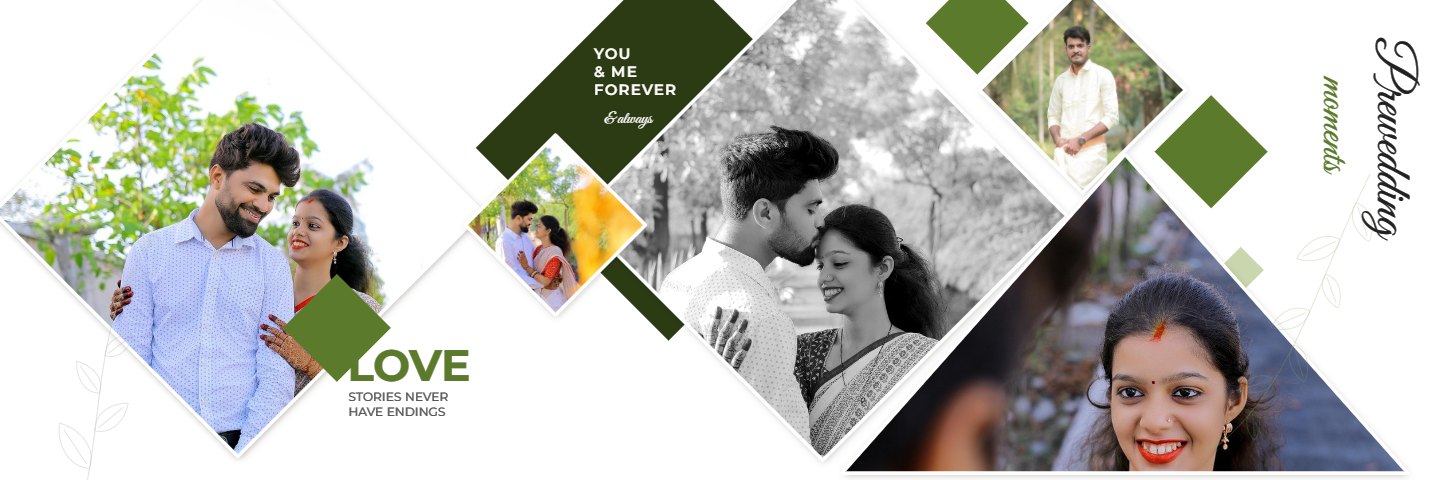
The Love Story Album is 10 modern 12×36 inch spreads for a couple shoot, a pre-wedding session or bride portraits: diamond and triangle photo cuts, round and oval photos inside white rings, dry-brush photo edges, tilted prints, ribbon labels, big faded initials and script titles such as Made for each other, The Bride, Our story and Forever. The couple’s names, initials and wedding date fill the spreads, every word can be changed, and each spread downloads as a layered PSD and a 300 DPI print JPG.
Design your love story albumPrice: ₹499 (US$9.99) one-time for this album design, or included in any plan · See plans
What you get
- 10 spreads: olive diamonds, wine circles, arcs, grey brush, the bride, pink moments, blue ovals, wedding story, the beautiful bride, beautiful soul
- Couple spreads and bride-only spreads with round, oval, diamond, triangle and brush-edged frames
- Designer mix colours (olive, wine, grey and gold, sage, pink, denim), or one colour set for every spread
- 12×36 inches (two 12×18 pages) at 300 DPI, layered PSD plus print JPG
- The bride’s and groom’s names, initials and date fill every spread
Which photos suit each spread
The 10 spreads hold about 62 photos, from five on the simpler spreads to eight on Memories and Wedding story. The Bride, The beautiful bride and Moments are made for solo bride portraits, so keep your best close-ups and half-length poses for them. Olive diamonds, Wine circles and Blue ovals mix one or two big couple photos with smaller round or diamond frames, which suit candid laughs, walks and detail shots. Arcs and Wine circles carry one wide landscape photo across the middle, a good place for a sunset or a location frame.
Couple shoot, pre-wedding or wedding
The designs work for a pre-wedding shoot, an engagement or couple session and the bride's portraits on the wedding day. Titles like Made for each other, Our story, Cherished and Forever are ordinary text, so you can rename any spread, add a line in your own language, or turn PRE / WEDDING into the couple's names. The bride's and groom's names, their initials and the wedding date fill in from the album details.
Choosing a colour set
Designer mix keeps each spread in the colours it was designed in: olive, wine, grey with gold, soft sage, pink with tangerine and denim with gold. If the album should feel calmer, pick one colour set for every spread from the Design tab; wine suits maroon and red outfits, sage suits green and pastel ones, and grey with gold sits quietly behind any colour.
How to design your album
- Open the Love Story Album in the album maker.
- Drop your photos into the frames; move and zoom each one.
- Type the names and words, and pick a colour scheme.
- Download layered PSD files and 300 DPI JPGs for your print lab.
Questions
What size is the Love Story Album?
Each spread is 12x36 inches, two 12x18 pages side by side, at 300 DPI (10800 x 3600 pixels).
Can I use only bride photos?
Yes. Three spreads are designed for solo bride portraits, and any frame takes any photo, so a bride-only album works as well as a couple album.
Do I need Photoshop?
No. Add photos, edit the words and pick colours in the browser, then download print JPGs, one ZIP or a PDF for the lab. The layered PSD is there if you or your album designer want to edit further.
Other albums
 Wedding Album14 spreads · 12×36 in · layered PSD and 300 DPI JPG
 Pre-Wedding Album20 spreads · 12×36 in · layered PSD and 300 DPI JPG
 Birthday Album24 spreads · 12×36 in · layered PSD and 300 DPI JPG
 Baby’s First Year12 spreads · 12×36 in · layered PSD and 300 DPI JPG
 Maternity Album12 spreads · 12×15 in pages · layered PSD and 300 DPI JPG
 Photo Calendar13 pages · 12×18 in · PSD, JPG and PDF
 Desk Calendar13 pages · 8×7 in · PSD, JPG and PDF
 Birthday Calendar Photo Frame1 page · 8×10 in (4:5) · JPG, PDF and PSD